
Shopify Theme Adaptation · Specialty Coffee
Knowing What Not to Rebuild
How I adapted Prestige for a specialty roaster spanning retail, subscriptions, two cafés, catering, and wholesale, while keeping the theme's proven commerce systems intact.
View live store- Shopify
- Prestige
- Theme Adaptation
- Metafields
- Recharge
- Client
- Boxwood Coffee Roasters, a New Jersey specialty coffee brand
- Period
- Q2 2025
- Industry
- Specialty coffee: retail, subscription, and café hospitality
- Platform
- Shopify
- Theme
- Prestige by Maestrooo
- Role
- Storefront implementation lead, theme and front end
- Scope
- Brand adaptation, theme configuration, product metafields, reusable sections, app integration
- Delivery
- Iterative work in the theme, synced through Shopify's GitHub integration
One storefront, several customer intents
Boxwood is an established specialty coffee brand, and one storefront has to carry a lot: bagged coffee, tea, brewing equipment and gifts, a subscription program, two physical cafés, a catering path, a wholesale path, and an editorial Journal. Each speaks to a different customer with a different intent.
The client wanted a premium Shopify build on Prestige, not a bespoke framework rebuilt from the ground up. That was the right instinct. Prestige is a mature commercial theme with reliable commerce behavior already solved. The work was to make it feel unmistakably like Boxwood, support every business surface cleanly, and add engineering only where the theme could not carry the requirement on its own.
Customer paths
- Retail: coffee, tea, equipment, gifts
- Subscriptions
- Two neighborhood cafés
- Catering
- Wholesale
- Editorial Journal
Configure, extend, or integrate?
Configure
When Prestige already solves the requirement and only needs settings and content.
- Prestige layouts and settings
- Native variants
- Cart and checkout
- Search and filtering
Extend
When a native component is structurally right but needs brand presentation or product data it does not carry.
- Coffee metafields
- Reusable product sections
- Collection card details
- Product templates
Integrate
When a requirement already lives in an app or vendor and only needs connecting, placement, and brand consistency.
- Recharge subscriptions
- Square café ordering
- Wholesale with BSS and Tally
- Catering with FlashQuotes
The boundaries were not perfectly clean. The value was in using the framework consistently, and reaching for custom work only where a requirement genuinely needed it.
Where Prestige stayed in control
- Product form and add to cart
- Cart and drawer
- Search and predictive search
- Collection filtering and sorting
- Customer accounts
- Recharge purchase logic
These purchase-critical systems already provided the behavior the store needed. Keeping them native reduced the custom surface and preserved compatibility with the theme, Shopify, and installed apps.
I adapted the presentation. I did not fork the behavior.
Coffee pages
Coffee pages built from metafields and reusable sections
Specialty coffee carries information a general store theme does not ship fields for: origin, region, elevation, process, variety, roast profile, tasting notes, and brewing guidance. A shopper deciding between two single-origin lots is reading exactly those fields.
Purchasable options stay native variants
Grind and weight stay as native Shopify variants, because that is what they are: options that change the cart. The theme's product form and variant logic handle them unchanged.
Descriptive attributes become metafields
The descriptive attributes were modeled as product metafields, so they live with the product rather than in the layout. Origin, process, roast, and tasting notes belong to the coffee, not to a hardcoded template.
Reusable sections that hide when empty
I authored a small set of reusable product-page sections that read those metafields, render them in a consistent layout, and hide themselves when a field is empty. Routine seasonal launches do not require a theme-code change when the existing metafields and sections cover the product. A limited release and a year-round blend use the same system.
- Roast
- Light
- Origin
- Guji, Ethiopia
- Process
- Washed
- Tasting notes
- Jasmine, peach, bergamot
This reconstructed interface illustrates where native Shopify functionality and metafield-driven content appear on the page. It is an explanatory visual, not a production screenshot.
How a coffee page renders
Empty value
Section hides itself
One navigation layer for shopping and visiting
Boxwood is both an online store and two neighborhood cafés, so the navigation had to do more than list collections. It had to move a visitor between shopping online and visiting a location without breaking the brand feel.
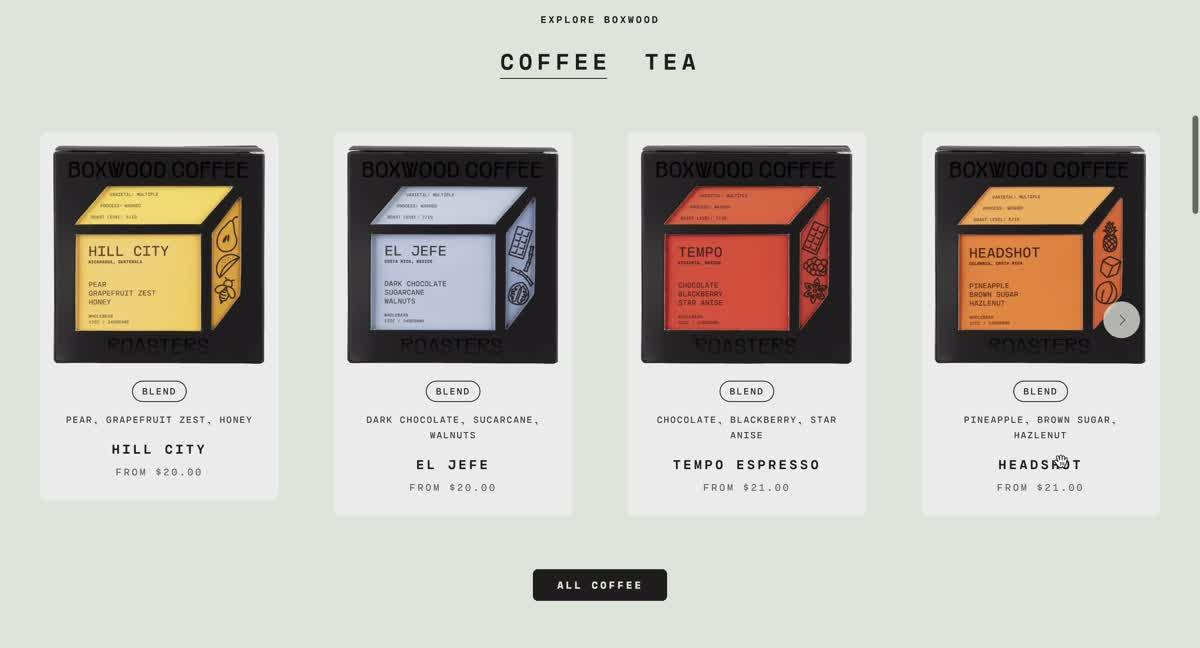
The bespoke mega-menu pre-existed the first commit. I adapted and integrated the existing mega-menu so it presents product cards alongside café visit cards in one branded navigation experience. Someone browsing coffee sees featured products; someone thinking about a café sees the two locations with directions, so the transition remains clear and visually consistent.
On mobile, the same paths appear in the drawer navigation: product entry points, the two café locations with directions, and clear back navigation, with comfortable touch targets.
Several systems, one brand
Retail
Shop coffee, tea, equipment, gifts
ShopifyNative
Subscriptions
Subscribe and manage
RechargeVendor
Café order-ahead
Order for pickup
SquareVendor
Wholesale
Apply for an account
Tally with BSS access controlVendor
Catering
Request a quote
FlashQuotesVendor
Transactional ownership stays with each vendor. The work was integration, placement, navigation, templates, and visual consistency, not one unified backend.
Built for seasonal change
- Compose and reorder homepage sections
- Edit pages with native Prestige sections
- Launch seasonal coffee through products and metafields
- Update subscription landing content
- Manage collection merchandising
- Update wholesale and catering content and links
Content and seasonal merchandising are self-serve. Structural changes remain engineering work: navigation behavior, the metafield schema itself, and any behavior injected by apps.
What is verified, and what is expected
Verified in the implementation
- A Prestige-based storefront adapted to the Boxwood brand
- Native commerce behavior preserved rather than rebuilt
- A reusable set of metafield-driven coffee sections powering the product pages
- Retail, subscriptions, cafés, catering, and wholesale presented through one storefront
- Seasonal product content managed through Shopify data
Expected
- Less developer dependency for routine content and seasonal updates
- Lower maintenance risk than rebuilding native behavior
- A more coherent customer path across the business surfaces
Conversion and revenue measurement was outside the scope of this engagement.
Trade-offs
Some custom sections duplicate native capability
Why it matters: A few subscription and FAQ sections could have been native sections with styling.
Next maintenance step: Fold them back into styled native sections.
Brand CSS is more distributed than ideal
Why it matters: Styling ended up scattered across the theme, which adds friction to future edits.
Next maintenance step: Consolidate brand styles into a smaller shared surface.
External flows depend on separate vendors
Why it matters: Subscriptions, wholesale, catering, and café ordering run on different platforms.
Next maintenance step: Keep the integration seams documented and consistent.
Staying close to Prestige reduces but does not remove maintenance
Why it matters: The custom layer still needs attention when Prestige or the apps update.
Next maintenance step: Keep custom code concentrated and reconcile it on theme updates.
These define the maintenance work I would prioritize next.
Related deep dive
One implementation story from this project.
Selected stack
Theme foundation
- Prestige by Maestrooo
- Shopify Liquid
- OS 2.0 sections
Commerce
- Shopify product form
- Native cart
- Search and filtering
- Recharge
Product content
- Product metafields
- Native variants
- Reusable product sections
Business integrations
- Square
- Tally
- BSS
- FlashQuotes
Delivery
- Shopify GitHub integration
Ownership
Precise by design: I inherited Prestige and Shopify's commerce engine, configured and extended the theme, adapted and integrated the existing mega-menu and the vendor flows, and authored the coffee metafield sections. The vendor transaction systems are owned by their providers.
Code: the theme lives in the client's private repository. Anonymized versions of these implementations I show on request.
Previous case
Absolute Support
Extending Dawn for a complex medical compression catalog, custom experience over a native commerce engine.
Hand over the storefront. Consider it handled.
Send the task and the goal. From there I read the code, take the work through release and verify it myself.
Already have Figma layouts? I can take them through to a finished Shopify store. If you need design too, I can develop the visual direction and layouts as part of the project.
Start a conversation